
Introduction
The product and order import tool can import supplier files that contain product and order information. To create the products and purchase orders through the tool instead of manually creating them.
The tool has been designed to be user-friendly. However, if you are unfamiliar with manual product creation in Fashione and Excel spreadsheets, we recommend that you seek assistance from our support desk.
The tool can import just products or import products and their order quantities to create purchase orders.
The documentation and videos in this help centre are basic. For more advanced information on Product and Order Importing, please contact our support desk.
File Requirements
The file needs to contain supplier style and cost price, at least.
The sizes must go down in the rows and not across in the columns.
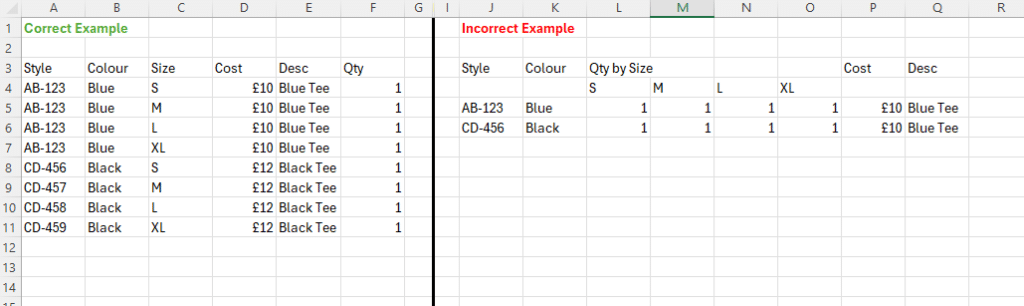
Import Tool Requirements
Required Product Fields:
| Brand | Import from the file or select from the system. |
| Supplier Style | Import from the file. |
| Colour | Import from file or not applicable. |
| Size | Import from file or not applicable. |
| Description | Import from file or not applicable. |
| VAT Rate | Import from the file or select from the system. |
| Cost Price | Import from File Only. |
| Retail Price | Import from file or not applicable. |
All the other fields below are optional:
Product:
Supplier, Season, Category and Department
Import from the file, select from system or not applicable.
EAN Barcode, SKU, Commodity Code and Style Reference
Import from the file or not applicable.
Purchase Orders:
Order Period/Season
Import from the file, select from system or not applicable.
Order Qty
Import from the file. Not selecting a qty and processing the import will only create the products.
Reference
From File or not applicable. Not applicable allows you to type in your own order reference.