
Initial training video
The video below is our initial POS training video and covers:
- Sales, Returns and Exchanges
- Discounts
- Gift Vouchers & Credit Notes
- Standard POS Functions
- End of Day
- Customer Tracking (Basic)
- POS Transfers
Printable POS Guide

POS Overview
Transaction Screen
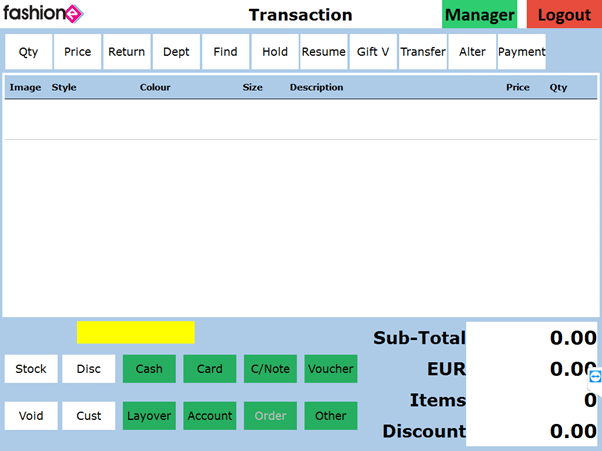
| Qty | Change Qty. |
| Price | Individual Item Discount. |
| Return | Return Items. |
| Dept | Open Departments. Sell a nonstock item. |
| Find | Product Search. |
| Hold | Hold a transaction. |
| Resume | Resume a held transaction. |
| Gift V | Sell a gift voucher/card. |
| Transfers | Not Standard – Transfer stock to another location. |
| Alt | Not Standard – To Process an Alteration. |
| Payments | Not Standard – To apply payments to layovers and accounts. |
| Stock | Check stock levels on item selected. |
| Void | Delete Item(s) from the transaction screen. |
| Disc | Overall Transaction Discount. |
| Cust | Not Standard – Customer Search. |
| Green Payment Methods | Cash, Card, C/Note, Voucher and others. |
| Manager | Opens manager screen. |
Managers Screen
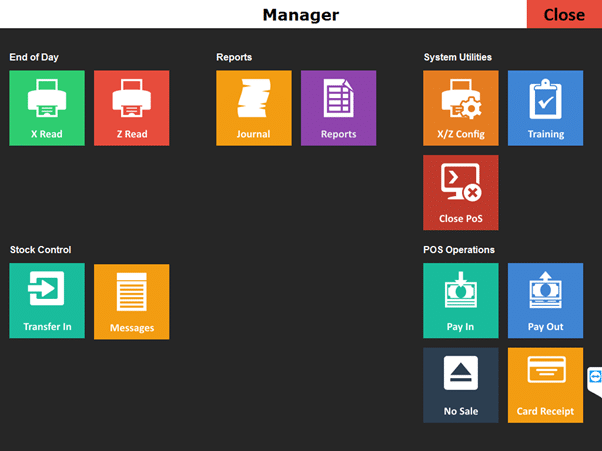
| X Read | Basic POS reports |
| Z Read | End of Day cashing up. |
| Journal | Diary of daily sales. |
| X/Z Config | X/Z report settings. |
| Close POS | Close POS program. |
| No Sale | To open the cash drawer. |
| Pay Out | Taking cash from cash drawer. |
| Pay In | Add cash to the cash drawer |
| Transfer In | Not Standard – Accepting in Transfers. |
| Messages | Not Standard – Sales alert messages from integrated website. Stock request messages for other locations. |